Build an AI Buyer List to reach the whole market

Use this when

You're starting a process and want serious buyers beyond your rolodex.

An AI Buyer List looks past the buyers already on PrivSource, and past your rolodex, for every buyer in the market who fits your deal. We research strategic acquirers, private equity firms, and family offices, and every buyer comes with analyst-level research on why it fits.

This guide walks you through starting a list, confirming your inputs, and reading the results.

Step 1: Describe your deal

In the left navigation, click AI Buyer List. Upload a teaser or CIM, or enter the company details directly.

Include the industry, business model, location, and size. Add anything that would give a buyer a specific reason to acquire the business.
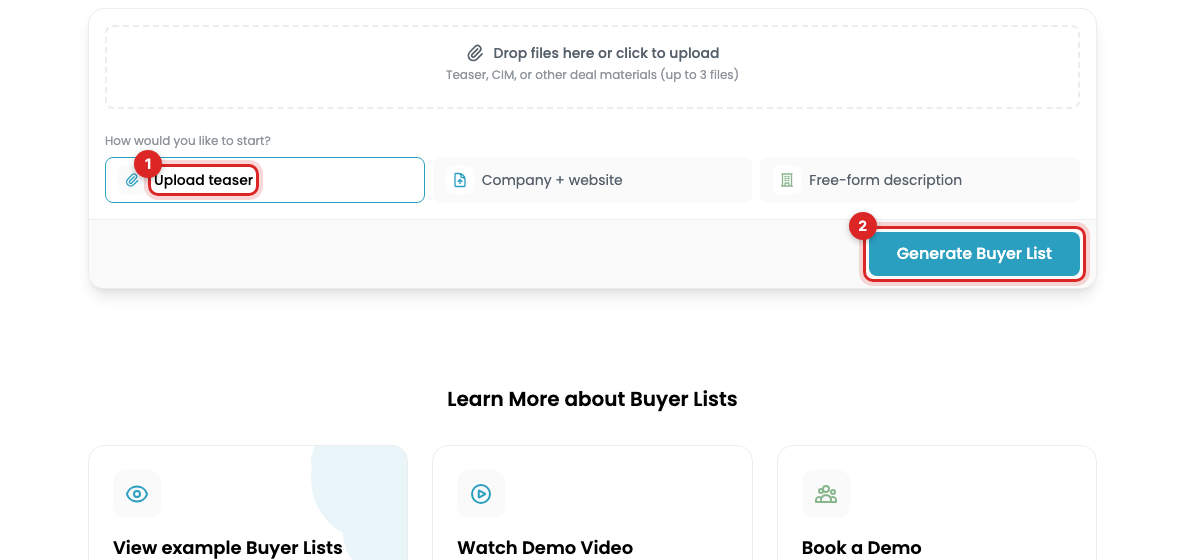
The AI Buyer List start page with Upload teaser and Generate Buyer List marked

Step 2: Confirm the details and start research

Review the extracted company profile and correct anything missing or inaccurate.

Optional: upload the buyers you already have, whether a prior list or names from your rolodex. We use them two ways:

  • Dedupe. Every name on your AI Buyer List is net new.
  • Signal. We find more buyers like the ones you already rank highest.

Click Generate Buyer List. Research runs in the background, so you can leave the page and come back. A full list takes about 5 to 10 minutes.

Step 3: Review the buyers

Open the completed list from the Your Buyer List tab. A full list typically returns 100 to 150 buyers.

Click any buyer to see why it's on the list. Every buyer comes with a reason to buy, whether they've bought businesses like yours or their published criteria are a strong fit for your deal.

Read the research and hand-pick who belongs in your process.
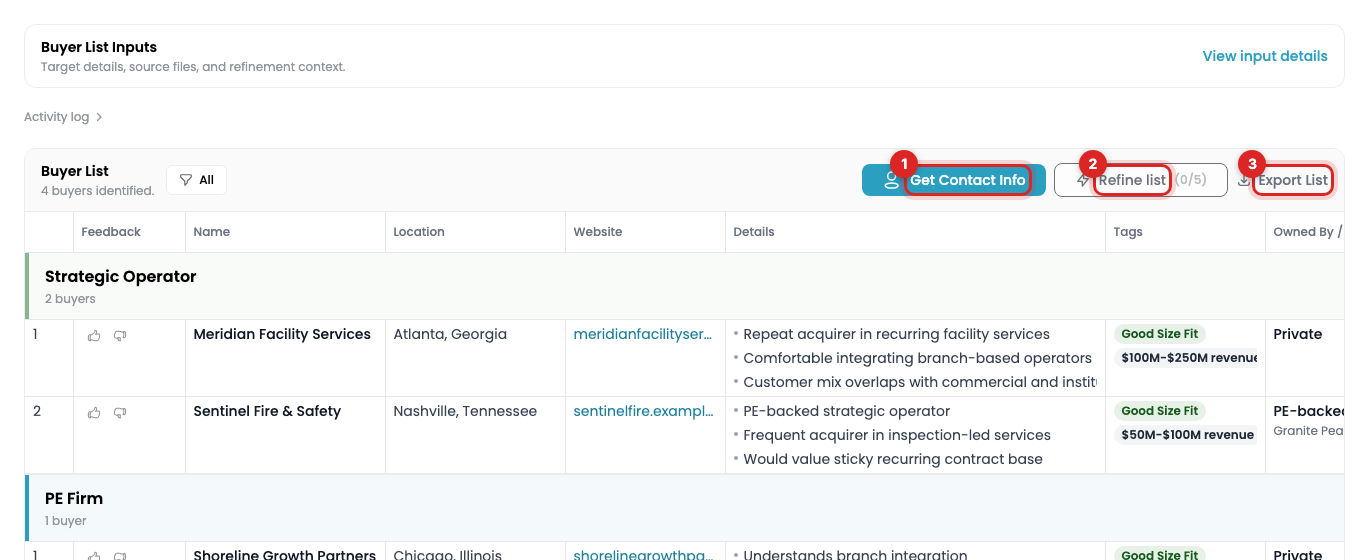
A completed buyer list with Get Contact Info, Refine list, and Export List marked

What's free and what's paid

Every deal you submit gets a free preview of about 15 buyers once it's approved. Expand to a full list for $199.

PrivSource members run full AI Buyer Lists on every deal they're working. $299 a month covers your whole team. No success fee, ever.

Mandate matches are separate and always free. They connect your deal with buyers who have a live mandate on PrivSource.

See pricing for full details.

Next: Refine your buyer list, get contacts, and export.

Frequently asked questions

How is an AI Buyer List different from mandate matches?

Mandate matches are buyers with a live mandate on PrivSource. The AI Buyer List looks across the whole market for every other buyer who fits.

Why is each buyer on the list?

Every buyer comes with a reason to buy your deal, built from transaction history and live research. That reason is your opening line.

How do I buy a single list?

Submit your deal. Once it's approved, we generate your free preview automatically, and you can expand to the full list from there.

Do this with Claude

Connect PrivSource to Claude once and run this workflow from a conversation. Same account, same access. Set up the connection

Starter prompt

Full workflow guide →
Copy into Claude

Using PrivSource, create a buyer list for a company we're selling: [describe the company — industry, revenue, location, business model]. Set up the criteria and show them to me before generating. Then start generation and share results as they complete. I'll give feedback on results so we can refine the list, and I may ask for M&A contact info on the best fits.

Then try

  • “Create a buyer list for a $12M revenue commercial landscaping company in Florida”
  • “Mark these five as poor fits and refine the list”
  • “Request contact info for the top 20 buyers”

Agent instructions

The skill file PrivSource publishes for this workflow. Give it to any agent that supports skills, or read it to see exactly what the tools do.

Raw SKILL.md
Show the full instructions

PrivSource Buyer Lists

A buyer list is a seller-side workflow that finds potential acquirers for a company being acquired.

Critical Meaning

Buyer-list criteria describe the acquisition target company/business being sold.

Do not treat sector, subsector, size_band, geography, business_model, end_markets, customer_type, revenue, EBITDA, or size as criteria for potential acquirers. For example, $10M-$25M revenue means the target company has that revenue range, not that buyers must have that revenue range.

MCP Workflow

  1. Call create_buyer_list with a description of the target company being acquired. If the user already has buyers from a prior process, pass them as existing_buyers (see the privsource-expand-buyer-list skill) — they guide the search and are excluded from results.
  2. Poll get_buyer_list_current_version until status is needs_review.
  3. Review criteria. If needed, call update_buyer_list_criteria.
  4. Call generate_buyer_list after required criteria are present.
  5. While status is processing, call get_buyer_list_current_version for counts and get_buyer_list_results for completed rows. Do not wait for the full build before starting analysis.
  6. Continue polling until status is ready for the final result set.
  7. Use update_buyer_list_result_feedback to mark rows positive, negative, or none.
  8. Use refine_buyer_list on a completed version when feedback and instructions should produce a new version.
  9. Use request_buyer_list_contact_info only after the buyer list is ready.

Statuses

  • analyzing: target-company criteria are being extracted.
  • needs_review: criteria can be reviewed and edited.
  • processing: buyer rows are being generated. Completed rows may already be readable.
  • ready: generation is complete.
  • processing_contacts: contact enrichment is running.
  • ready_with_contacts: contact enrichment is complete.
  • errored or canceled: report the state and error if present.

Refinement

Before refining, collect feedback on rows. Positive-rated rows are carried forward; refinement instructions should describe what to change in the next version.

Good refinement examples:

  • More PE-backed platforms with existing Texas operations.
  • Exclude public strategics; focus on founder-owned regional operators.
  • Keep positives and add more healthcare-focused strategics.

Contact Info

request_buyer_list_contact_info can consume credits. Phone lookups cost additional credits. scope defaults to all; use positive to enrich only positive-rated rows.

Exports

Call get_buyer_list_export with the list id and optional version_number.
The response returns the file directly in export.content. No browser sign-in is needed.
If encoding is base64, decode content to bytes. If it is utf-8, use the text directly.
Save the result using filename and content_type, or analyze the CSV text in the agent.
Check ready first. Unavailable exports return unavailable_reason without file content.
The XLSX includes the dashboard columns and available contacts. Sample lists cannot be exported.
dashboard_url is optional context. It is not required to get the file.

Stuck on a step?

Tell us what you need help with.

Related guides