When you find a deal that fits, tell the seller you're interested and send a message to start the conversation. Replies come directly to your email inbox.
This guide walks you through reviewing materials and contacting sellers on Direct Listings and on deals our AI sourcing agent found.
Step 1: Select Interested on a Direct Listing
Open the deal and select Interested. The seller receives a notification. For paid buyers, this also unlocks the available teaser, NDA, and message button on the deal page.
Note: Some sellers don't upload a teaser or NDA. We show these materials when the seller provides them.
Step 2: Read the materials and message the seller
Read the teaser if one is available. If there's an NDA, download and sign it. You can upload the signed copy from the NDA step on the deal page.
Select Message seller to introduce yourself. Say who you are, why the deal fits, and what you want to discuss. If you signed an NDA, attach it to your first message to help start the conversation.
Step 3: Continue in your email inbox
PrivSource sends your message to the seller by email. When the seller replies, the response goes directly to the email address on your PrivSource account.
PrivSource doesn't host back-and-forth messaging. Our job is to make the introduction. From there, the conversation, and the path to the CIM, moves to your inbox.
Step 4: Contact sellers on deals we found
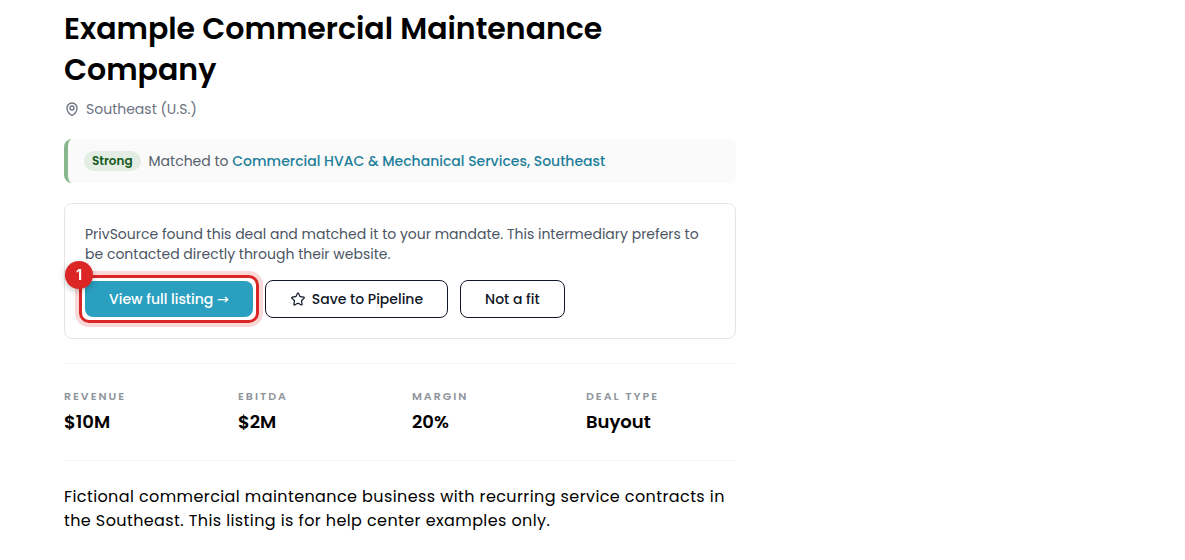
Our AI sourcing agent also tracks down deals that fit your mandate from brokers, M&A advisors, and bankers across the market. Some of these sellers prefer to be contacted through their own website. When that's the case, we note it at the top of the deal page.
Select View full listing and follow the contact or NDA instructions on the seller's website. Use Save to Pipeline to track the deal in PrivSource.