PrivSource Buyside Mandates
Buyside mandate tools are buyer-side. They manage the authorized buyer account's own acquisition mandates — the criteria sellers browse when looking for buyers — and the deal matches PrivSource finds for published mandates. Drafts are private; publishing makes a mandate visible to seller accounts.
Workflow
- Call
privsource_whoami if unsure whether the account has buyside-mandates access.
- Call
list_buyside_mandates to find existing mandates before creating a new one. Filter with status (draft, published, archived).
- Call
create_buyside_mandate with a title to start a draft. Add criteria in the same call or later with update_buyside_mandate.
- Call
get_buyside_mandate and check publishable and missing_fields before publishing.
- Call
publish_buyside_mandate only when the user asks to publish and missing_fields is empty. Publishing makes the mandate visible to sellers, so confirm intent first.
Reviewing Deal Matches
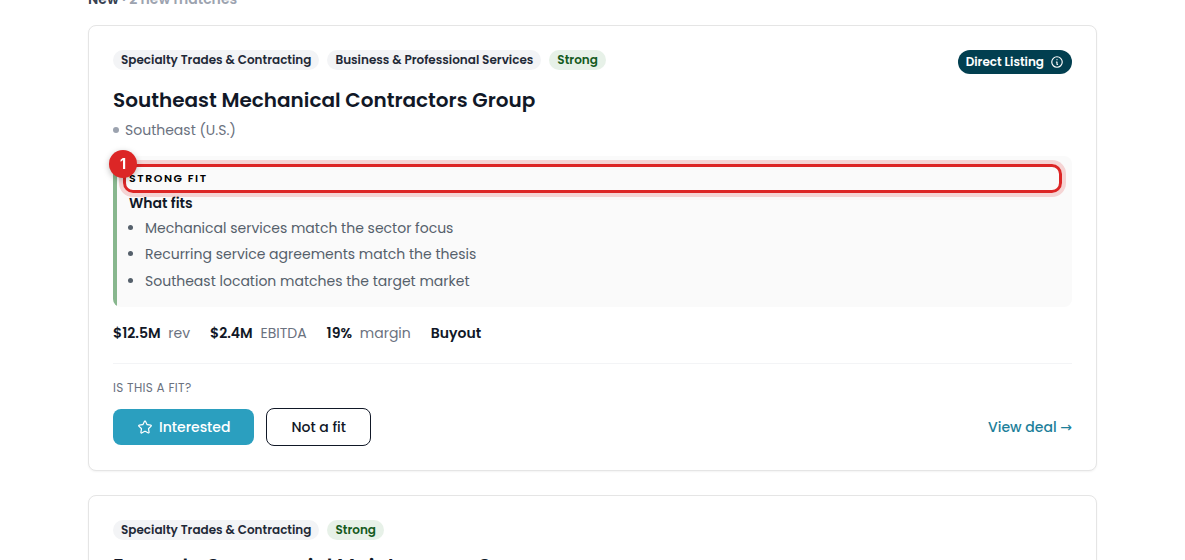
PrivSource matches live deals against published mandates. Each mandate from list_buyside_mandates includes match_count, strong_match_count, and to_review_count — use them to pick which mandate has matches worth reviewing.
- Call
get_buyside_mandate_matches with the mandate id. Matches come back ordered by fit with a score, a fit_band (strong or possible), an explanation, and a review_state. Filter with review_state (to_review, in_pipeline, not_a_fit); meta.review_state_counts shows the split.
- If
meta.matches_first_time_finding is true, PrivSource is still building the mandate's first matches — say matching is in progress rather than reporting that nothing matched.
- Each match includes a deal summary.
available: false means an engaged stale match remains visible for history but the deal is no longer on the market. direct_listing: true means the seller shared it directly; shared_by identifies that seller, and Direct Listings lead their fit band.
- Pass an available match's
deal.id to get_deal for full details; send_deal_outreach works on contactable deals.
- Call
update_buyside_mandate_match to record the buyer's verdict: review_state: in_pipeline saves the deal to the buyer's pipeline (Interested on a direct listing), not_a_fit passes on the deal and hides it from the feed, and to_review undoes either. Set feedback_comment only for not_a_fit matches to explain why you passed.
- Saving to pipeline and hiding act for the whole buyer account, so confirm intent before changing review states in bulk.
Mandate Learnings
When the account has mandate learnings, get_buyside_mandate includes learnings and archived_learnings arrays from the buyer's match feedback. Each learning has these fields:
id: the identifier for update_buyside_mandate_learning.dimension: the observable deal attribute (sector, geo, size, business_model, customer, or characteristic).direction: the ranking effect (exclude, penalize, or boost).rule: one declarative matching rule.evidence_type: explicit for comments or implicit for behavior.event_count: the number of supporting feedback events.status: pending for a one-event signal or active after two or more supporting events.observations and evidence_match_ids: the evidence summary and referenced matches.
learnings_analyzing is true while a refresh is running. Treat a pending learning as a weak signal.
Review active learnings before editing a mandate. Apply agreed changes with update_buyside_mandate.
Ignore a learning with update_buyside_mandate_learning and archived: true. Restore it with archived: false. These are the same actions as the dashboard.
Field Meaning
All criteria describe the companies the buyer wants to acquire.
min_revenue / max_revenue and min_ebitda / max_ebitda: target company financials in whole US dollars. Use the no_min_* / no_max_* booleans when the mandate explicitly has no bound.industry_groups: the primary industry must come from the PrivSource mandate taxonomy (enumerated in the tool schema); each group takes optional sub_industries and a free-text niche. The array replaces the mandate's existing groups.locations: PrivSource location names such as countries, U.S. regions, U.S. states, or Remote. The array replaces the mandate's existing locations.industry_agnostic / no_geographic_preference: set these instead of industries/locations when the mandate has no preference.description: the investment thesis; must be at least 100 characters before publishing.close_timeline: required before publishing.
Publish Requirements
Publishing requires a descriptive title, a 100+ character description, industry preferences (groups, agnostic, or exclusions), at least one revenue or EBITDA value, geography (locations or no preference), and a close timeline. Resolve missing_fields from get_buyside_mandate first.
Error Handling
- Archive and unarchive with
update_buyside_mandate's archived flag. Archived mandates must be unarchived before publishing.
- If a tool reports validation errors, fix the named fields and retry rather than guessing new values.
Feedback notes are only available for not_a_fit matches. Set the state and pass reason together, or edit an existing pass reason.
Exports
Call get_buyside_mandate_matches_export with the mandate id.
The response returns the file directly in export.content. No browser sign-in is needed.
If encoding is base64, decode content to bytes. If it is utf-8, use the text directly.
Save the result using filename and content_type, or analyze the CSV text in the agent.
Check ready first. Unavailable exports return unavailable_reason without file content.
The CSV includes all dashboard review states and fixed columns. Paid buyer and Deal Network access are required.
dashboard_url is optional context. It is not required to get the file.